01 Overview
The problem
Oil spills cause severe ecological and economic damage. Once oil is in the water it moves with the surrounding flow and can spread across large areas — threatening marine life, coastlines and fishing zones. The practical questions are simple to ask and hard to answer:
- Where does the oil go?
- How fast does it spread?
- How much of it reaches a sensitive area?
- Can we show this in a way decision-makers understand?
Approach
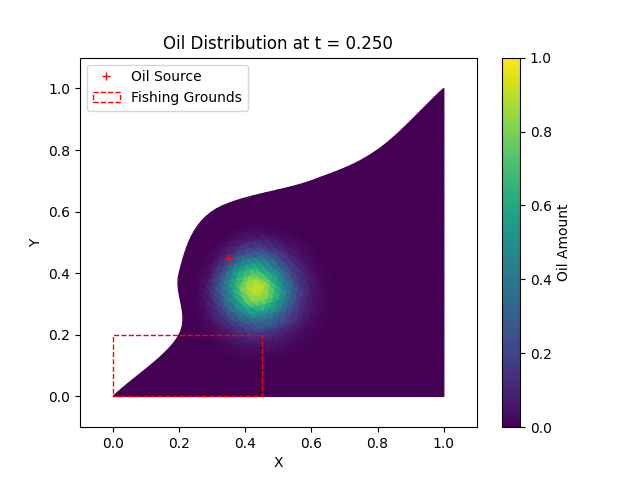
I represented the bay as a triangular mesh loaded from a .msh file. Every triangle is a small computational cell that stores how much oil it currently holds. At each time step, neighbouring cells exchange oil through their shared edges, driven by a velocity field and the geometry of the edge — a finite-volume style upwind scheme.
- Load the mesh and build cell objects
- Initialise oil around a source point
- Pre-compute neighbour relationships and edge normals
- Step the oil distribution forward in time
- Integrate the amount of oil inside the fishing-grounds polygon
- Write frames, an animation and a log for analysis
The goal was not a perfect ocean model, but a clear, testable one that shows how computation can support environmental risk decisions.
Engineering
The code is split into small, testable modules — mesh.py for geometry, cells.py for cell types, Simulator.py for time stepping and Visualizer.py for plots and video. Runs are configured with TOML files and launched from a CLI with argparse; every run writes a structured log. A pytest suite covers mesh loading, cell geometry and the simulator.
python main.py --config input.tomlWhat I learned
- Turning a physical process into a discrete numerical scheme
- Mesh-based modelling and neighbour graphs
- Time-stepping stability and conservation
- Writing scientific code that is configurable, logged and tested
- Communicating results visually — frames and video, not just numbers
Tech stack
- Python
- NumPy
- meshio
- Matplotlib
- OpenCV
- TOML
- pytest
Metrics
- 2D – Triangular mesh domain
- 500 – Time steps per run
- t = 0 → 0.5 – Simulated interval
- 3 – Test suites (pytest)